Sustainability in AV, Conferencing & Collaboration, Learning Solutions, The Podcast Channel, Sustainable AV , and 1 more
Speaker Tracking and Auto Camera Switching
In video conferencing, the camera must clearly show whoever is speaking for better interaction and engagement. Two technologies enable this: Speaker Tracking and Auto Camera Switching.
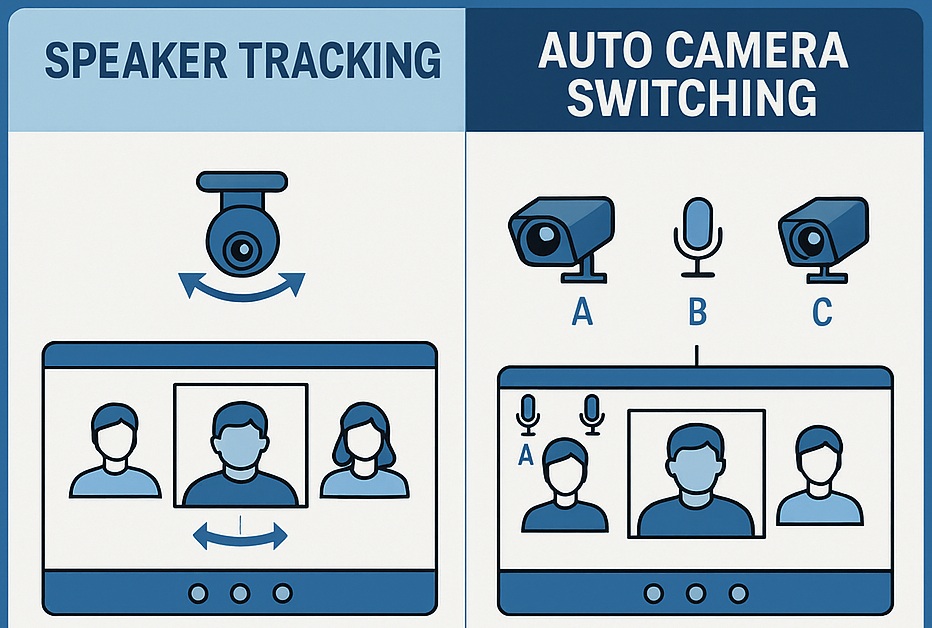


In modern video conferencing environments, the quality of visual communication is just as critical as audio clarity. As meeting rooms evolve into hybrid collaboration spaces, the need for intelligent camera behavior becomes essential participants must be clearly visible, naturally framed, and actively highlighted as they speak. Two key technologies address this requirement: Speaker Tracking and Auto Camera Switching.
Both methods aim to enhance remote meeting experience by ensuring the active speaker remains the visual focus, but they operate very differently. Speaker Tracking uses AI-driven PTZ movement to follow and frame the person who is currently speaking, creating a natural, broadcast-like output. On the other hand, Auto Camera Switching selects the most appropriate camera feed based on sound source localization or microphone gating, switching views without physically moving the camera.
Understanding the difference between these two approaches is essential for designing boardrooms, classrooms, town halls, training centers, and high-end collaboration spaces. The choice between them influences not just system architecture, but also the realism, smoothness, and engagement of the meeting experience.
1. Speaker Tracking (Active Speaker Tracking)
Speaker tracking refers to a camera system that automatically identifies the active speaker and physically pans/tilts/zooms (PTZ) to frame them.
Key Characteristics:
-
Uses microphones, DSP beam tracking, voice localization, or AI facial detection.
-
A single PTZ camera or multiple PTZ cameras may move to follow the speaker.
-
Produces smooth transitions like pan, tilt, zoom, face framing, and follow within the same camera.
-
Works best in boardrooms, classrooms, training rooms, hybrid meetings.
Advantages:
-
Natural, broadcast-style single-focus framing.
-
Good for lecture capture or presentations.
-
Engaging viewing experience, especially for remote attendees.
Limitations:
-
Camera movement takes time (latency).
-
Continuous follow may feel distracting if many users speak quickly.
-
Works best with directional mic arrays / beam tracking mic placement.
2. Auto Camera Switching (Voice-activated Camera Switching)
Auto camera switching selects between multiple fixed or PTZ cameras based on who is speaking or location presets—without moving the camera.
Key Characteristics:
-
System switches between camera feeds (Cam1, Cam2, Cam3).
-
No physical camera movement needed.
-
Often triggered by DSP mic gating, beam zones, or AV control logic.
-
Used in multi-zone rooms, panel discussions, huddle spaces.
Advantages:
-
Fast switching with minimal delay.
-
No PTZ motion artifacts → looks cleaner.
-
Scales well for large rooms with multiple participants.
Limitations:
-
Hard cuts can feel abrupt without transition effects.
-
May switch too frequently if crosstalk or noise triggers mic gates.
-
Needs careful microphone isolation + logic programming.
| Feature | Speaker Tracking | Auto Camera Switching |
|---|---|---|
| Operation | PTZ camera moves to speaker | Feed switches to camera nearest speaker |
| Camera Type | Usually PTZ | Fixed or PTZ can be used |
| Output Style | Smooth follow & framing | Quick hard switching |
| Ideal for | Training, lectures, presenters | Panel discussions, boardrooms |
| Dependency | AI + beam tracking + PTZ motors | Mic gating/Zones + Control logic |
| Pros | Natural framing, focus on one person | Faster response, simpler multi-camera logic |
| Cons | Motor latency, possible jitter | Frequent cuts if mis-tuned |
Simple Understanding:
🔹 Speaker Tracking = One camera follows the person who is speaking.
🔹 Auto Camera Switching = System jumps to whichever camera sees the active speaking zone.
Solution Design Engineer and Consultant, AV Industry
- Started Journey as Live sound System Engineer For small AV company in 2007.
- Then join one Dubbing studio and Done Some Movies Dubbing and Music Mixing Till 2008.
- After 2008 Started working as Freelancer for Audio Jobs as Recording, Dubbing and Mixing engineer for regional language Music and Movies.
- From 2010 corporate journey Started with Manufacturer of AV Acessories in India.
- Till 2012 worked as Technical Marketing team Head for the Product developments and Possible solutions for Pro Audio and Video Industry Acessories.
- After 2013 Started working for Pro Audio Industry Products as BDM for West India.
- From 2016 Working as Individual Audio, Video and Acoustics Design Consultant for freelance projects across India and in global market.
-
Xchange Advocates are recognized AV/IT industry thought leaders and influencers. We invite you to connect with them and follow their activity across the community as they offer valuable insights and expertise while advocating for and building awareness of the AV industry.
Recommended Content
Immersive Experiences, Workforce Development, Sustainability in AV, AI in AV, Conferencing & Collaboration, Learning Solutions, Business of AV, Xchange Community Chat, Celebration of AV Excellence, Sustainable AV , AV/IT Buyers, AV Education for The Next Generation, Xchange Advocate Room
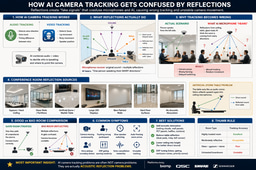
How AI camera tracking gets confused by reflections
Immersive Experiences, Sustainability in AV, Broadcast AV, Live Events / Performance Entertainment, Business of AV, The Podcast Channel, AVIXA Consultants Council, Xchange Community Chat, Celebration of AV Excellence, Sustainable AV , AV Education for The Next Generation, Xchange Advocate Room
Calibration in audio isn’t just “making it sound good”