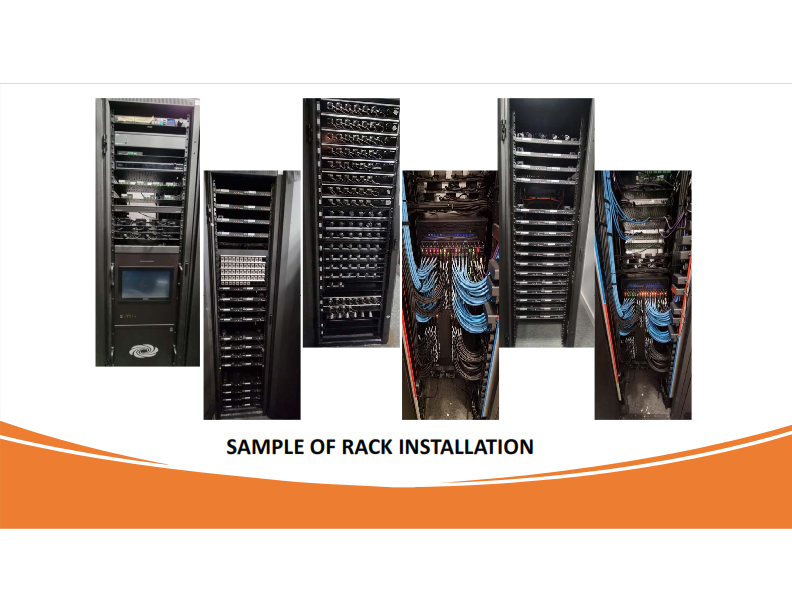
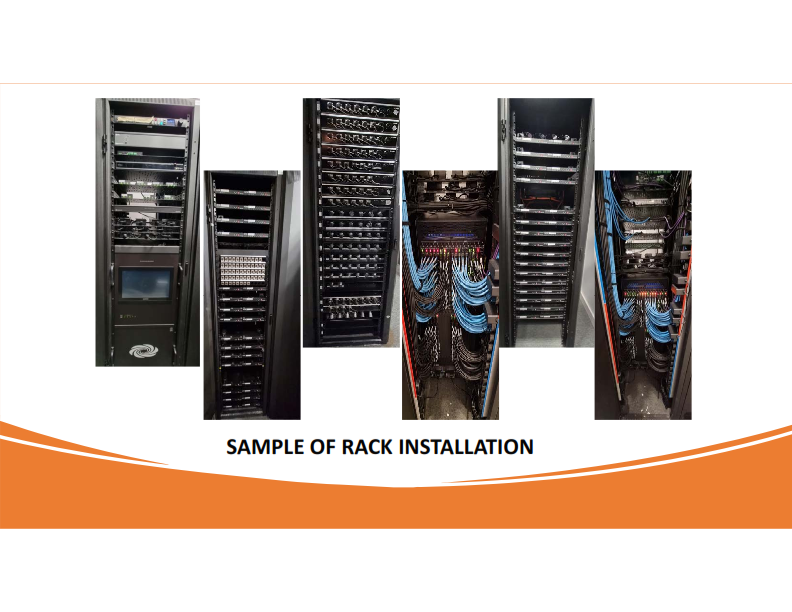
Ready to design AV Rack ?
Designing an AV rack in accordance with AVIXA standards and ensuring proper airflow is crucial to maintain the performance and reliability of audio-visual systems.
Ready to design AV Rack ? From where to start ? factors to be taken into consideration ?
Designing an AV rack in accordance with AVIXA standards and ensuring proper airflow is crucial to maintain the performance and reliability of audio-visual systems. Are you ready to follow the following steps and considerations for designing an AV rack:
A- Determine the size and dimensions of the AV equipment rack to accommodate all necessary components.
B-Follow this basic guideline for proper equipment placement within the rack:
Place heavy equipment at the bottom and lighter equipment at the top.
Leave adequate space between equipment for airflow.
Consider weight distribution to ensure the rack can support the weight of all the equipment.
Use rack shelves, drawers and cable management panels for organization.
Follow recommended manufacturer guidelines for mounting equipment, such as using proper fasteners and brackets.
C-Proper cable management is essential for both airflow and maintenance , Consider the following:
Use vertical and horizontal cable management options to route and secure cables neatly.
Label all cables for easy identification.
Follow bend radius guidelines to avoid damaging cables.
Use Velcro Tape instead of cable ties for Video/Fiber cables.
Incorporate proper cable separation to prevent interference and signal degradation.
D- Cooling and Airflow: Overheating can damage AV equipment. Plan for proper ventilation and airflow to prevent overheating of the equipment.
Using cooling fans or ventilation panels where necessary.
Maintaining front-to-rear airflow to avoid hot spots.
Avoiding cable clutter that can obstruct airflow.
Minimum AC should be provided to maintain proper AV devices functionality as per manufacturer recommendation
E- Prevent equipment from overheating by:
Monitoring temperature using built-in sensors or external devices.
Installing cooling systems like exhaust fans or air conditioners, if needed.
F- Secure the Rack:
Ensure the rack is anchored securely to prevent accidents and vibrations that can affect AV equipment.
Use rack rails to securely mount equipment, ensuring stability and preventing movement.
Consider security measures, such as lockable doors or panels, to protect valuable equipment.|
G-Power Management:
Use a reliable power distribution unit (PDU) with surge protection and individual outlet control.
Avoid overloading electrical circuits.
H-Grounding:
Properly ground all equipment to protect against electrical surges and ensure safety.
Incorporate proper grounding and electrical safety measures to prevent electrical hazards.
I- Access and Serviceability:
Design the rack layout to allow easy access for maintenance and repairs without disrupting the entire system.
Choose wall mount or floor mount based on accessibility and Rack room size.
Provide adequate clearance space at the front and rear of the rack for easy access and maintenance.
Ensure easy access to power outlets and network connections for efficient setup and troubleshooting.
J- Maintain detailed documentation of the AV rack layout, schematic, including equipment list, cable routing, and power connections.
K- Testing and Commissioning:
Test the entire AV system after installation to ensure proper functionality.
Make any necessary adjustments to optimize performance.
L- Training and Maintenance:
Train end user/operator staff on how to operate and maintain the AV system. Develop a regular maintenance schedule to keep the system in peak condition.
M-Future Expansion:
Plan for future equipment additions and changes to the system when designing the AV rack. Leave room for expansion and cable routing.
Remember that AV technology and standards are evolving always ! so it's essential to stay updated with the latest AVIXA guidelines and industry best practices for AV rack design and management. Additionally, consulting with a professional AV systems integrator can be beneficial to ensure compliance with AV standards and proper system functionality.
You can always Follow industry standards and regulations to ensure compliance and compatibility with AV systems such as: - AVIXA F502.02:2020 ( Rack Design for Audiovisual (AV) Systems Standard)
-AVIXA F502.01:2018 ( Rack building for Audiovisual System
Xchange Advocates are recognized AV/IT industry thought leaders and influencers. We invite you to connect with them and follow their activity across the community as they offer valuable insights and expertise while advocating for and building awareness of the AV industry.