
Navigating the Hybrid Paradox: A Blueprint for Modern AV Excellence



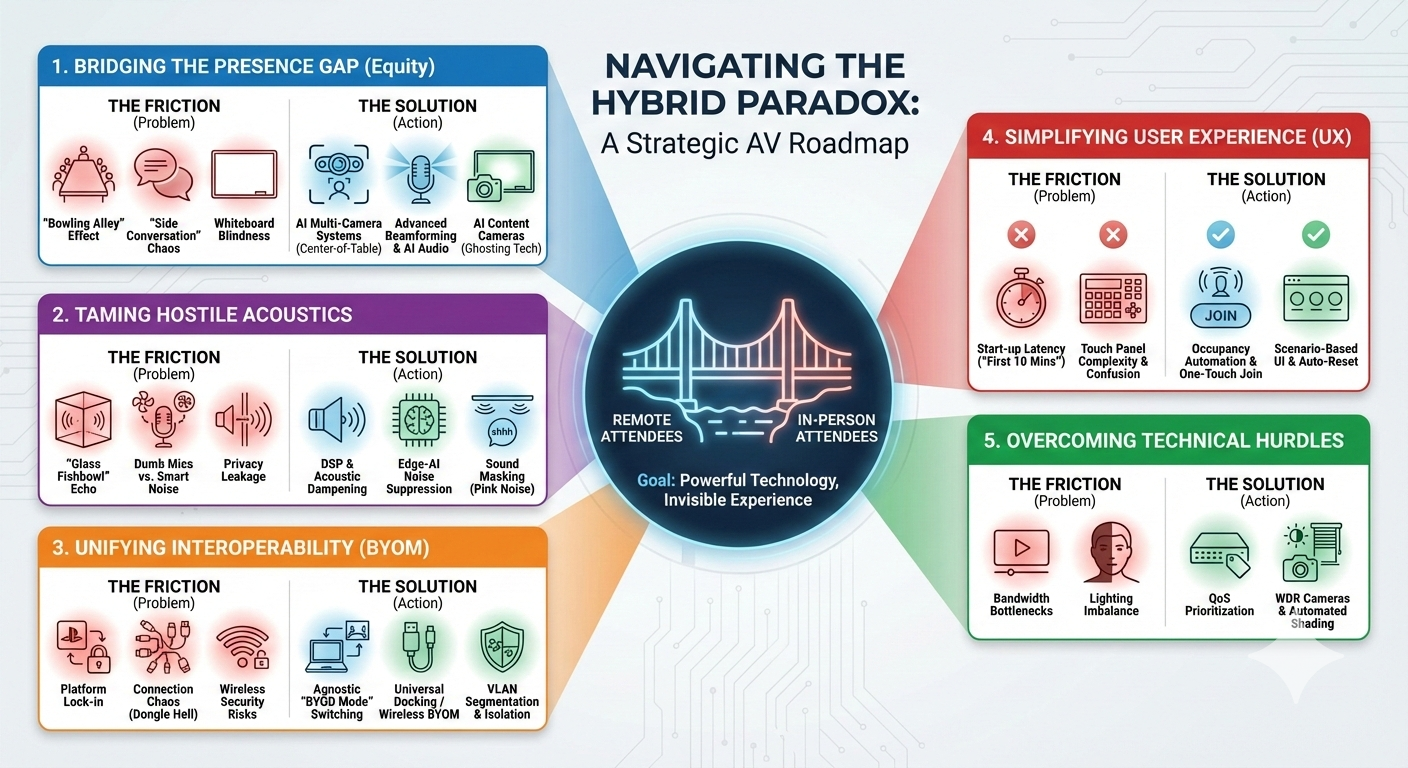
The core conflict remains the "Hybrid Paradox": technology must be powerful enough to bridge the gap between remote and in-person attendees, yet simple enough to be invisible.
Below are the key challenges and the corresponding technical or strategic solutions.
The "Presence Disparity" (Equity Gap)
The Challenge: Ensuring remote participants don't feel like second-class citizens compared to those in the room.
The "Bowling Alley" Effect
- Problem: Cameras at the front of long tables make rear participants look tiny, and remote viewers miss facial expressions.
- Solution: AI-Driven Multi-Camera Systems. Deploy "Center-of-Table" cameras (like the Logitech Sight or Neat Center) or systems with "Intelligent Director" capabilities. These use AI to detect active speakers and switch to a close-up "portrait" view of their face, regardless of where they are seated.
The "Side Conversation" Problem
- Problem: Cross-talk and quiet chats are cut out or garbled by single-stream codecs.
- Solution: Advanced Beamforming & Audio Fencing. Use ceiling tile microphones (like Shure MXA series) with narrow pickup lobes. Combine this with AI audio processing that supports "full-duplex" communication, allowing simultaneous speech to be transmitted clearly without aggressive gating.
Whiteboard Blindness
- Problem: Physical writing is invisible to remote users without expensive, rarely used tools.
- Solution: AI Content Cameras (Ghosting Technology). Install dedicated content cameras (like Logitech Scribe or Huddly Canvas). These use AI to digitally enhance the marker ink contrast and render the presenter "transparent" so they don't block the view while writing.
Hostile Acoustic Environments
The Challenge: Modern office aesthetics (glass, hard surfaces) actively fight against audio quality.
The Glass Fishbowl
- Problem: Hard surfaces create high reverberation, muddying speech and causing listener fatigue.
- Solution: DSP & Acoustic Dampening. While physical treatment (acoustic baffles, heavy curtains) is ideal, it is often rejected by architects. The tech solution is a powerful Digital Signal Processor (DSP) with aggressive Acoustic Echo Cancellation (AEC) and de-reverberation algorithms tuned specifically for the room's dimensions.
Intelligent Noise vs. Dumb Microphones
- Problem: Mics pick up HVAC hum, paper crinkling, and tapping as loudly as voices.
- Solution: Edge-AI Noise Suppression. Move away from standard mics to hardware with onboard "Edge AI" (like newer Poly or Cisco bars) that identifies and filters non-speech sounds before the audio stream leaves the device, rather than relying solely on the conferencing software (Teams/Zoom) to do it.
Privacy Leakage
- Problem: Sensitive audio bleeds out of glass rooms; external noise bleeds in.
- Solution: Sound Masking (Pink Noise). Install sound masking emitters in the plenum space outside the meeting room. This raises the ambient noise floor just enough to make human speech unintelligible to passersby, securing the conversation without needing soundproof bunker walls.
Interoperability & "Platform Wars"
The Challenge: The "Bring Your Own Meeting" (BYOM) trend creates friction between competing ecosystems.
Platform Lock-in
- Problem: A room native to Microsoft Teams offers a clumsy experience when joining a Zoom call.
- Solution: Agnostic "BYOD Mode" Switching. Use room logic (via Q-SYS or Crestron) that automatically switches the room's peripherals (camera, mic, speakers) from the dedicated Room PC to a user's laptop via USB the moment a laptop is plugged in. This effectively turns the room into a "dumb" peripheral for any platform.
Connection Chaos (Dongle Hell)
- Problem: Varying USB-C standards and missing adapters delay meetings.
- Solution: Universal USB-C Docking or Wireless BYOM. Standardize on single-cable docking solutions at the table that provide power, video, and USB data simultaneously. Alternatively, use wireless BYOM systems (like Barco ClickShare Conference) that allow users to connect to room peripherals wirelessly, eliminating cables entirely.
Wireless Security
- Problem: Wireless presentation systems bridge guest devices and corporate networks, creating risks.
- Solution: VLAN Segmentation & ISO Layer Isolation. Ensure all wireless casting devices are on a dedicated "IoT/AV" VLAN that cannot route traffic to the internal corporate servers. Use devices that generate their own localized Wi-Fi Access Point for guests, keeping them completely off the building's infrastructure.
The "Ghostware" Issue (User Experience)
The Challenge: Functional hardware fails if the interface is too intimidating to use.
Start-up Latency (The "First 10 Minutes")
- Problem: Time is lost waking up the system or pairing devices.
- Solution: Occupancy Automation & One-Touch Join. Integrate occupancy sensors. When a person walks in, the screens should wake, lights should brighten, and the touch panel should display the scheduled meeting with a large, green "Join" button. No "waking up" required.
Touch Panel Complexity
- Problem: Over-engineered panels confuse users; altered settings leave the room "broken."
- Solution: Scenario-Based UI & Auto-Reset. Simplify the UI to verbs (e.g., "Present," "Call," "Video"). Crucially, program a "Room Reset" macro that triggers automatically when the occupancy sensor detects the room is empty, resetting volume, camera zoom, and lighting to default for the next group.
Emerging Technical Hurdles
The Challenge: High-fidelity video and lighting demands are outpacing standard infrastructure.
Bandwidth Bottlenecks
- Problem: 4K streams freeze when the office Wi-Fi gets busy.
- Solution: QoS Prioritization. Implement Quality of Service (QoS) rules on the network switch. Tag AV data packets (Video/Audio) with higher priority than standard email or web browsing traffic to ensure smooth playback even during peak network usage.
Lighting Imbalance
- Problem: Top-down lighting creates shadows; windows create silhouettes.
- Solution: WDR Cameras & Automated Shading. Use cameras with High Dynamic Range (HDR) or Wide Dynamic Range (WDR) sensors that can balance light/dark extremes. Pair this with automated blinds linked to a light sensor—if the sun hits the window, the blinds lower automatically to prevent washout.

🎯 Role Overview
🔸AV Systems Designer / Solutions Architect
🔹Crafting bespoke audio-visual systems tailored to client needs.
🛠️ Core Responsibilities
🔸Designing customized AV solutions with precision and technical depth.
🔸Creating comprehensive technical documentation.
🔸Acting as a technical authority during business development.
🔸Managing multiple projects while balancing account managers' expectations.
💻 Specialization in Video Conferencing Platforms
🔸Expertise in designing AV systems for:
🔹Microsoft Teams Rooms, Zoom Rooms, Webex Rooms, Google Meet Rooms
🔧 Technology Stack
🔸Solutions built using leading AV brands:
🚀 Design Philosophy
🔸Integration of the latest corporate AV trends.
🔸Focus on innovation, security, and scalability.
🔸Incorporating networking and security into AV designs.
🔸Ensuring alignment with user experience through close collaboration with teams and clients.
Recommended Content

LetsTalkAVbyAlexis Series: Episode 6:Designing a Successful Auditorium: Where Acoustics, Technology and Intent Converge

Please sign in or register for FREE
If you are a registered user on AVIXA Xchange, please sign in