





Congratulations, you’ve activated your company’s Active or Enhanced Provider Subscription on Xchange! If you were the person who claimed the profile on the company’s behalf, you are automatically an admin (assignee) and have access to edit the company’s profile and engage as the brand.
Are there others on your team who you’d like to assign as admins as well? Here’s how!
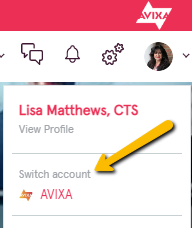
1. Click your avatar in the upper right and select “Switch Account” (you’ll have this option if you are an Assignee or “Owner”)
2. Click the avatar again and select “Edit Profile”
3. Scroll to the bottom of the page and click the “View Assignees” button. You’ll now see your name and any others who may be assigned to your organization.

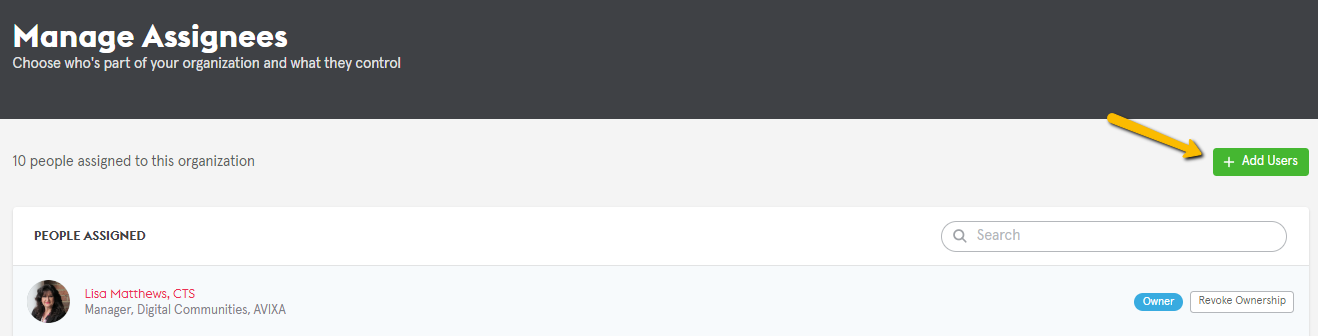
4. If you are the “Owner” *, you will have the ability to add individuals who have joined Xchange. Click the green “+ Add Users” button
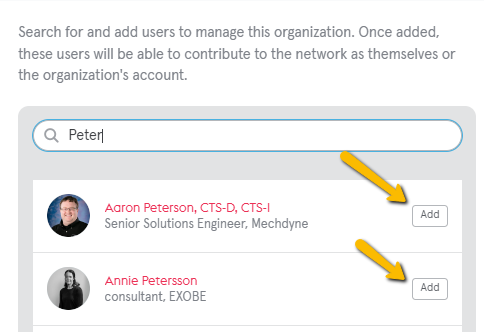
5. A panel will open on the right and you may begin typing a name. Once it populates, select “Add” and the next time that person logs in to Xchange, they will be able to “switch account” and admin the company profile!
*If you are not the Owner, you may request to be designated as Owner and/or you may request others be added by contacting xchange@avixa.org.
Please contact us if you need any help or have any questions! Either submit a request using the Support Form or reach us at xchange@avixa.org.

A marketing professional and 20-year AV industry veteran, I am a proud CTS holder and enthusiastic #AVfoodie who is passionate about innovative technologies, design, and all things AV.
I look forward to connecting with you here on Xchange and invite you to join me on LinkedIn as well.
To reach me, please message me on LinkedIn, as I am unable to reply to conversations here.