Edge AI -- Options for New and Old PCs

Upgrading Legacy Kiosks to Edge AI
Don’t Rip and Replace: Adding 26 TOPS of AI to Legacy Kiosks for Under $200
The most expensive phrase in the self-service industry is “end of life.”
AI accelerators for your PCs — This is a look at Hailo upgrade to PC. We also compare to the Giada alternative and cover Coral and Dragonwing as well.
https://keefner3.gumroad.com/l/nfsqh — Retrofit or Replace Decision Worksheet — xls + ROI calculator.
======================
For deployers managing 500+ kiosks in the field, the pressure to add modern features—like computer vision for loss prevention or facial authentication for check-in—usually comes with a terrifying price tag: replacing the entire PC.
If your fleet is running on standard Intel Core i5 or i3 processors from three or four years ago, those chips are perfectly capable of running Windows and your transaction app. They just fail at AI. They don’t have the NPU (Neural Processing Unit) required to process video streams in real-time without crashing the CPU.
The solution isn’t a forklift upgrade. It’s probably just a retrofit.
Enter the Hailo-8 AI Module.
What is the Hailo-8?
Think of it as a graphics card, but for AI, shrunk down to the size of a stick of gum.
The Hailo-8 is an M.2 AI Accelerator module. It fits into the same slot on your motherboard that you would typically use for a WiFi card or an NVMe SSD. Once installed, it acts as a dedicated brain for artificial intelligence tasks.
-
Performance: It delivers up to 26 TOPS (Trillions of Operations Per Second).
-
Efficiency: It typically consumes less than 2.5W of power, meaning you don’t need to upgrade your kiosk’s power supply or add massive cooling fans.
-
The Cost: The industrial-grade module typically retails between $170 and $200.
- And then there is LM2-100 from Giada (Shenzhen JIEHE Technology)
The Math: New PCs vs. The Retrofit
Let’s look at the ROI for a fleet of 500 kiosks.
-
Scenario A (The Rip and Replace): You buy 500 new industrial PCs with integrated NPUs (like the new Intel Core Ultra).
-
Cost: ~$800 per PC + labor to swap them out.
-
Total: $400,000+
-
-
Scenario B (The Hailo Retrofit): You open the existing box and slot in a Hailo-8 module.
-
Cost: ~$180 per module.
-
Total: $90,000
-
You save over a quarter-million dollars while unlocking the exact same computer vision capabilities found in brand-new hardware.
Installation & Compatibility
Before you order a box of modules, here is the technical checklist for your engineering team:
-
The Slot: Your legacy PC needs an available M.2 Key M or Key A+E slot. Most industrial box PCs from the last 5 years have at least one expansion slot open.
-
The OS: Hailo provides robust drivers for Windows and Linux. This is critical for kiosks, which often run on locked-down Windows 10 IoT Enterprise LTSC versions.
-
The Thermals: While the chip is efficient, AI generates heat. Ensure your kiosk enclosure has basic airflow. If your PC is a sealed fanless brick, you may need a thermal pad to bridge the module to the chassis for heat dissipation.
What Can You Do With It?
Once installed, your “dumb” kiosk suddenly has 26 TOPS of vision power. This enables:
-
Retail: Real-time object detection to spot non-scanned items at self-checkout.
-
Access Control: Face-based authentication for employee check-in (replacing ID badges).
-
Analytics: Anonymous audience measurement (age/gender/dwell time) for digital signage.
The Verdict
If your CPUs are still healthy, don’t retire them. Retrofit them. The Hailo-8 offers the most cost-effective bridge between the hardware you paid for yesterday and the AI features you need today.
A Warning
The Corporate Micro-PC Warning (Dell / HP / Lenovo)
Many operators try to save money by retrofitting standard 1-liter corporate desktops (like the Dell OptiPlex Micro or Lenovo ThinkCentre Tiny) housed inside their kiosks. While these machines do have M.2 slots, integrating a Hailo-8 into them presents two specific engineering challenges:
-
The M.2 Slot Trade-off: Inside a commercial micro-PC, the high-bandwidth M.2 Key M slot is almost always occupied by the primary NVMe boot drive. You cannot use it without removing the hard drive.
-
The Workaround: Hailo manufactures an A+E Key version of their module. You can pull out the PC’s Wi-Fi card and slot the AI module there instead. For mission-critical kiosks, losing Wi-Fi shouldn’t be a dealbreaker (they should be hardwired via Ethernet anyway), but it is a required architectural trade-off.
-
-
The Thermal Trap: An industrial fanless Box PC acts as one giant, extruded aluminum heat sink designed to dissipate the heat generated by AI components. A corporate micro-PC is a thin sheet-metal box with a single, small CPU fan. While the Hailo-8 is incredibly efficient, running continuous computer vision models inside a sealed, unventilated metal kiosk enclosure using a consumer-grade PC chassis is a recipe for thermal throttling.
(If you are using larger Small Form Factor (SFF) corporate towers, you bypass the M.2 issue entirely by using a standard $15 PCIe-to-M.2 adapter card, allowing you to keep both your boot drive and your Wi-Fi).
(Note: Some of the higher-end HP EliteDesk 800 G4/G5/G6 models do actually squeeze in a second M.2 storage slot, but you can never guarantee that across a mixed legacy fleet. Furthermore, the thermal warning still applies 100%—those tiny HP CPU fans are not designed to exhaust AI heat loads inside a sealed kiosk enclosure).
About the Author: Craig Keefner has over 40 years of experience in self-service technology. This guide is maintained independently by TIG – The Industry Group to provide fact-based hardware analysis.
More Resources
-
Beyond the Cloud: The 2026 Standard for Edge AI & NPU Integration
- Why Cloud AI is a HIPAA Liability for Patient Kiosks (And The Edge Inference Fix)
- Intel Core Ultra in Kiosks: Is “AI Boost” Just Marketing Fluff?
Video Example —
https://www.youtube.com/watch?v=XfsQMLietT0
Alternative Solution To Edge AI
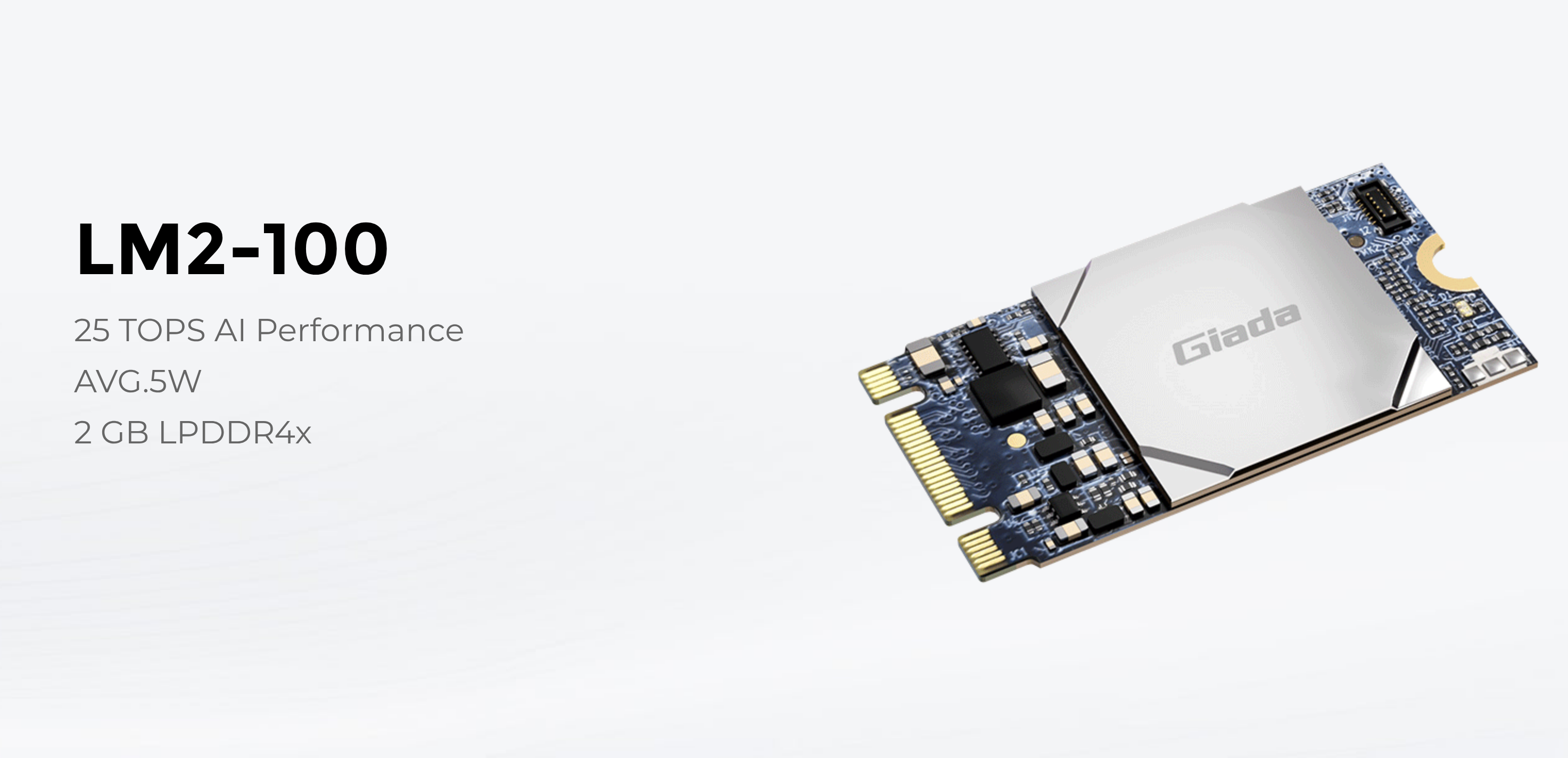
Hardware: LM2-100 Accelerator
- Performance: 25 TOPS AI Acceleration
- Form Factor: Standard M.2 (2280) Module
- Efficiency: Ultra-low power (3.6W)
Snapshot
- LM2-100 → aggressive value play (high TOPS, very low power, easy retrofit)
- Hailo → execution + ecosystem leader (better sustained performance, tooling, production maturity)
- Same category, different risk profiles
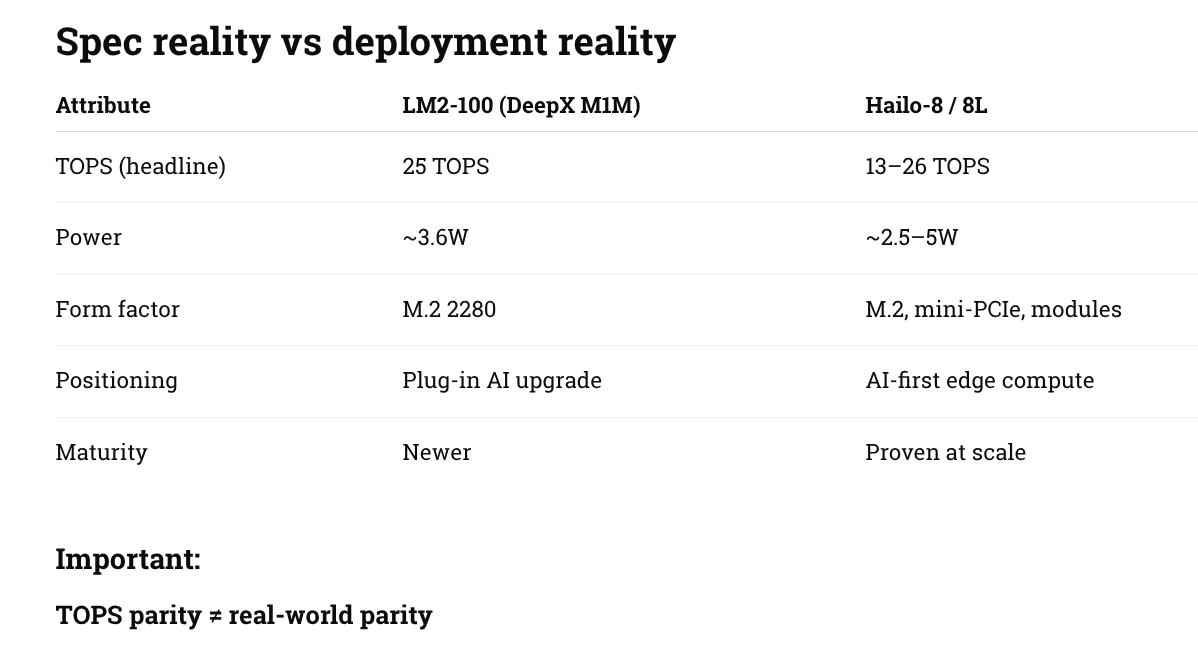
Hailo versus Giada
What actually matters in kiosks
1. Real throughput (not marketing TOPS)
-
LM2-100
- Strong raw compute on paper
- Best suited for:
- single camera inference
- object detection / classification
-
Hailo
- Better sustained pipeline performance
- Handles:
- multi-stream video
- concurrent models
- real-time workloads without dropping frames
👉 Translation:
- LM2-100 = “good engine”
- Hailo = “better drivetrain”
2. Software stack (this is the big one)
LM2-100
- Supports:
- TensorFlow
- PyTorch
- ONNX
- But:
- limited field-proven toolchain
- fewer pre-optimized models
Hailo
- Full stack:
- model zoo
- compiler + quantization tools
- runtime (HailoRT)
- Mature ecosystem:
- vision vendors
- integrators
- robotics + smart retail
👉 In your world:
- LM2-100 = developer project friendly
- Hailo = enterprise deployment ready
3. Integration into kiosk architecture
LM2-100 sweet spot
- Add AI to:
- existing Giada players
- Intel-based kiosks
- digital signage boxes
Use cases:
- people counting
- dwell analytics
- basic fraud detection
- queue monitoring
Hailo sweet spot
- Design into:
- new kiosks
- drive-thru AI
- self-checkout vision systems
Use cases:
- multi-camera loss prevention
- gesture + vision UX
- autonomous retail
4. Power + thermals (important for enclosures)
Both are strong here:
- LM2-100: very attractive at ~3.6W
- Hailo: similar efficiency but better under sustained load
👉 For sealed kiosks:
- both viable
- Hailo has more real-world validation
5. Risk profile
LM2-100
- Pros:
- low cost
- easy drop-in
- strong specs
- Risks:
- newer ecosystem
- unknown long-term support curve
- fewer large-scale deployments
Hailo
- Pros:
- proven deployments
- strong SDK + support
- scalable architecture
- Risks:
- higher cost
- slightly more integration effort
Strategic positioning
Where LM2-100 wins
- “AI upgrade kit” for installed base
- cost-sensitive rollouts
- fast pilots
- signage → AI conversion
Where Hailo wins
- enterprise rollouts (thousands of units)
- multi-modal AI kiosks
- anything tied to:
- revenue
- shrink/fraud
- compliance
Bottom line
LM2-100 is a very compelling disruptor on price/performance.
Hailo is still the safer bet for production-scale AI infrastructure.
Our recommendation
-
Use LM2-100 when:
- ROI needs to be proven fast
- you’re upgrading legacy kiosks
- AI is “nice to have”
-
Use Hailo when:
- AI is mission-critical
- scaling beyond pilot
- multi-sensor / real-time systems
What About Coral?
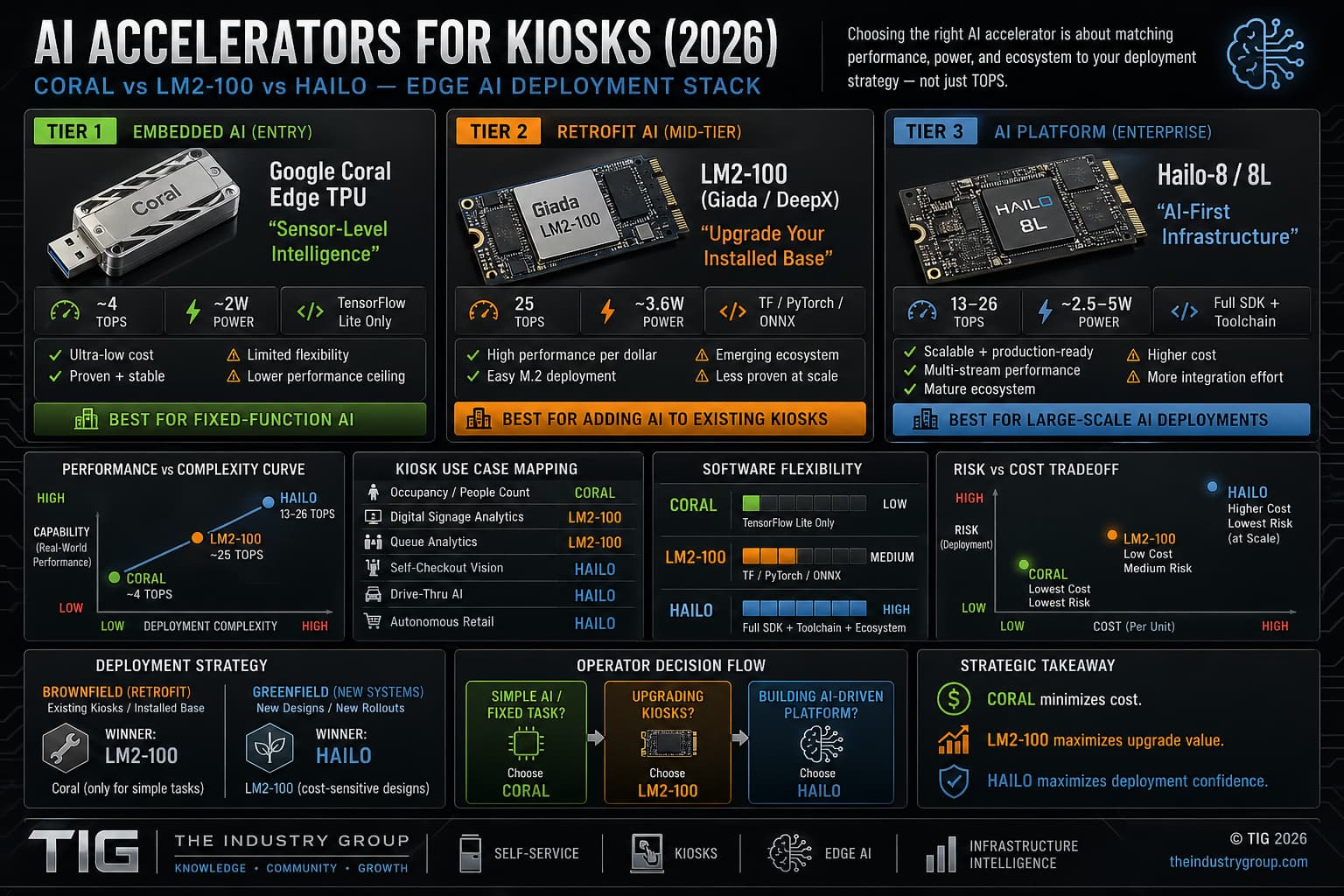
THE 3-TIER EDGE AI STACK
TIER 1 — EMBEDDED AI (ENTRY)
Google Coral Edge TPU
“Sensor-Level Intelligence”
- ~4 TOPS
- ~2W power
- TensorFlow Lite only
✔ Ultra-low cost
✔ Proven + stable
⚠ Limited flexibility
👉 Best for fixed-function AI
TIER 2 — RETROFIT AI (MID-TIER)
LM2-100 (Giada / DeepX)
“Upgrade Your Installed Base”
- 25 TOPS
- ~3.6W power
- TF / PyTorch / ONNX
✔ High performance per dollar
✔ Easy M.2 deployment
⚠ Emerging ecosystem
👉 Best for adding AI to existing kiosks
TIER 3 — AI PLATFORM (ENTERPRISE)
Hailo-8 / 8L
“AI-First Infrastructure”
- 13–26 TOPS
- ~2.5–5W
- Full SDK + toolchain
✔ Scalable + production-ready
✔ Multi-stream performance
✔ Mature ecosystem
👉 Best for large-scale AI deployments
PERFORMANCE vs COMPLEXITY CURVE
Capability ↑
Hailo ███████████████████████
LM2-100 ████████████████
Coral ███████
→ Deployment Complexity
REAL-WORLD KIOSK MAPPING
| Use Case | Best Fit |
|---|---|
| Occupancy / people count | Coral |
| Digital signage analytics | LM2-100 |
| Queue analytics | LM2-100 |
| Self-checkout vision | Hailo |
| Drive-thru AI | Hailo |
| Autonomous retail | Hailo |
SOFTWARE FLEXIBILITY
| Platform | Flexibility |
|---|---|
| Coral | Low (TFLite only) |
| LM2-100 | Medium (multi-framework) |
| Hailo | High (full toolchain) |
DEPLOYMENT STRATEGY
BROWNFIELD (RETROFIT)
- Winner: LM2-100
- Coral (only for simple tasks)
GREENFIELD (NEW SYSTEMS)
- Winner: Hailo
- LM2-100 (cost-sensitive designs)
RISK vs COST TRADEOFF
| Platform | Cost | Risk |
|---|---|---|
| Coral | Lowest | Lowest (simple use) |
| LM2-100 | Low | Medium |
| Hailo | Higher | Lowest (at scale) |
STRATEGIC TAKEAWAY
Coral minimizes cost.
LM2-100 maximizes upgrade value.
Hailo maximizes deployment confidence.
OPERATOR DECISION FLOW
- Simple AI / fixed task? → Coral
- Upgrading kiosks? → LM2-100
- Building AI-driven platform? → Hailo
BOTTOM LINE
Edge AI in kiosks is no longer one-size-fits-all.
It’s a tiered infrastructure decision.
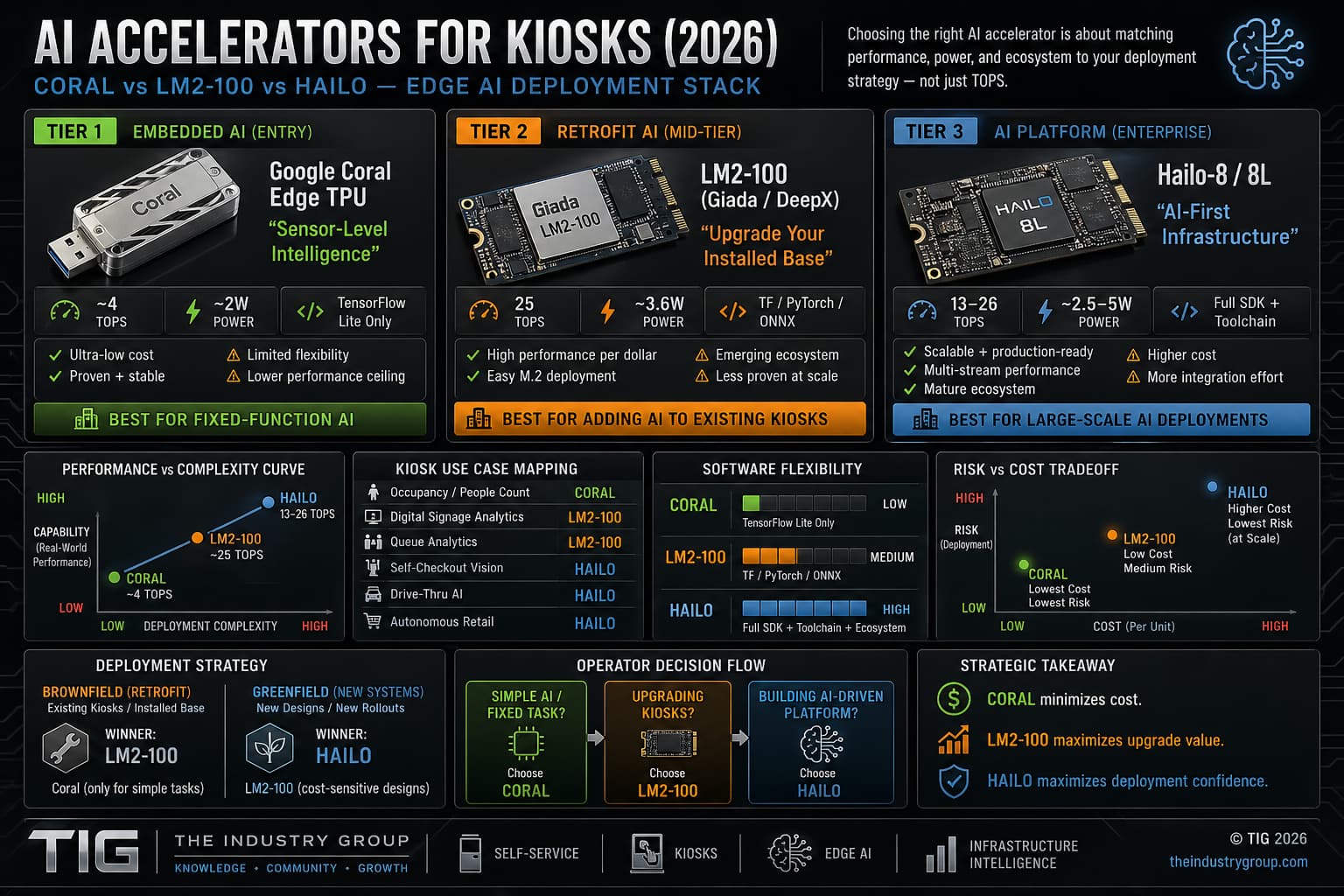
AI Accelerator Comparison – click for full size
Retrofit Links
-
Press Release – HIMSS 2026: Future-Proofing the Hospital Digital Front Door — Booth #3461
-
ADA Kiosk – Kiosk Retrofit for Usability & Accessibility Webinar
-
How Kiosks Meet EAA 2025 Compliance with Conversational Voice AI
-
Payment Kiosk News – Updating Pulse Machines with Modern Card Reader
-
Pick List
- Older computer PC (J1900 or i5 or i3 Dell e.g.)
- Edge accelerators
- Touch and touchless options
- Tactile interface like Audio Pad
- Cameras for Vision
- Gesture sensors
- Height or Tilt Adjust
- Latest PCI payment device (Ingenico AXIUM series)
- Accessible PIN pads (tactile + audio)
- Braille decals
- front facing speakers?
-
EAA:
- 3.5mm headphone jack module (mandatory in many EU interpretations)
- Tactile keypad (PIN entry + navigation)
- Speakers + amplified audio
- Microphone array (optional but increasingly expected)
- Braille-labeled keypad
- Raised tactile navigation buttons
- Physical “start accessibility mode” button
- Dot Inc. refreshable braille (emerging)
- Haptic feedback modules
- Audio confirmation systems
- Reach ranges (typically ~15”–48”)
- Knee/toe clearance
- Approach space for wheelchair
- Ideal
- Multimodal (voice + touchless + tactile)
- AI-assisted interaction (guidance, translation)
- Dynamic UI adaptation per user
Software layer:
- TPGi screen reader / TTS
- Audio navigation prompts
- High-contrast UI modes
- Larger font rendering (software)
- Anti-glare / high-brightness displays
- Optional: adjustable height or tilt mechanisms
- BOCA Systems printers
- 2D barcode / QR scanners
- Cameras (AI vision, identity, telehealth)
- Receipt printers, speakers
- 4G/5G modems & routers
- IoT gateways
- Remote monitoring modules
- LG Electronics webOS players
- BrightSign
- Android media boxes
And Then There is Dragonwing
Where Dragonwing wins vs loses
Wins
- Power efficiency
- Cost (fewer components)
- AI-native workloads (vision, voice, multimodal)
- Always-connected devices
Loses
- Enterprise IT compatibility (Windows ecosystem)
- Long lifecycle predictability (Intel still stronger)
- Upgradeability (monolithic design risk)
Dragonwing is not competing with Intel CPUs directly — it is competing with the entire Intel + GPU + AI accelerator stack.
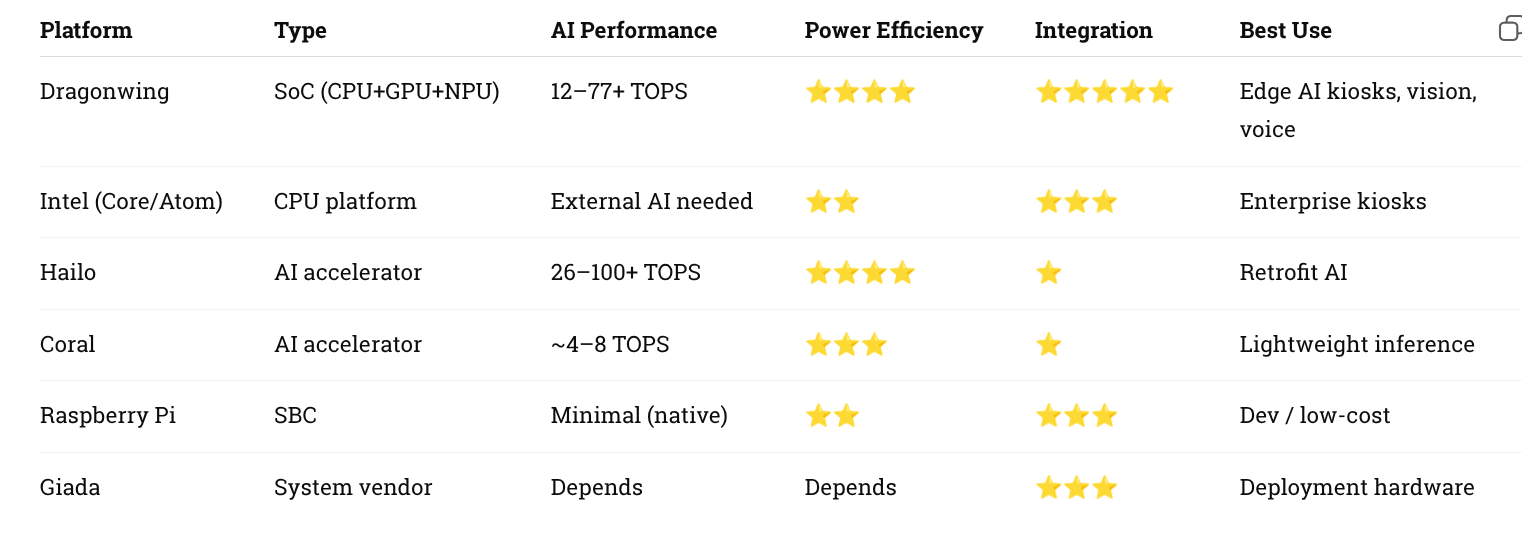
dragonwing compare
Pro Tip -- Sometimes it makes more sense to replace. You can make the argument between Intel and AMD but to date AMD still suffers from "zombie syndrome" when it comes to remote monitoring. For a large enterprise that is unacceptable. Stick with company like Giada and see all the options.
Author: Craig Allen Keefner
The Industry Group (aka Kiosk Association) comprises various related technology sites and news feeds from kiosks to digital signage to POS and Smart City. Retail Automation and EV Charging are others. Self-service technology (SST) is a type of technology that allows customers to perform various tasks without the assistance of a human. SSTs can bring many benefits to both customers and businesses, including cost savings, improved efficiency, and better customer experience.
The Kiosk Association comprises companies involved in self-service, digital signage, digital menus, outdoor technology, kiosks, point-of-sale, smart city, healthcare, telehealth, voice order, thin client, EV charging and retail automation.
Gold
- Pyramid Computer – Kiosks
- Olea Kiosks – custom/standard
- Intel Computing
- Vispero JAWS Screen Reader
- KIOSK Information Systems – Kiosks
- 22Miles Digital Wayfinding
- LG Business Kiosks Digital Signage
- Acquire Digital Software
- Sitekiosk Software
- Ingenico Payment
- imageHOLDERS Kiosks
- REDYREF Kiosks
- Crane CPI Payment Systems
- KT Group Kiosks
- Goldfinger Monitors – Digital Signage
- Giada Edge AI Mini-PCs more
- URway Holdings Conversational AI
- NZ Technologies Inc. Touchless Tech
- Innovative Technology – Cash Experts
- Best Kiosk ODM and OEM
- Kiosk Innovations Custom Design Engineering
- Full List
Silver
- MRI — outdoor smart city
- FEC Kiosks – standard kiosks
- UCP Unattended Payments payment terminals
- Datacap Systems, Inc. kiosk payment systems
- NMI — payment gateway
- Storm Interfaceassistive tech
- UST Vision Checkout — Built on AI. Designed for impact.
- Pantheon Creatives Pte Ltd – AI-powered digital humans
- panachedigilife.com – AI & IOT solutions
BRONZE
- Tech For All – accessibility consultants
- Self-Service Networks – gift card software
- Advanced Kiosks government
Associates
- WelcomeWare – virtual receptionist
- Insight Touch touchscreens + kiosks
- BOCA Systems Ticket & Receipt Printers
- Alveni– custom kiosks software
- SysTech Displays, Inc. — Braille, ATM decals
- Xtreme Power — kiosk UPS
- Pyramid Technologies kiosk printers
- TDS TOUCH Touchscreens AIO computers
- Actineon – Computers
- VidaBox Tablets
- PhotoAiD passport photo service
Featured
- Asia Self-Service – APAC
- Europe Self-Service – EU
- SelfService.io Hub site
- For Purchase