
Interactive Software for All Platforms

This update goes beyond a typical software release and instead highlights a broader shift across the self-service ecosystem—from platform software to edge hardware and deployment models. Starting with the latest SiteKiosk release, we see continued movement toward enterprise-grade requirements such as centralized identity management, accessibility hardware support, and tighter device control. At the same time, the expansion of SiteKiosk Online to Raspberry Pi signals a deliberate push into lower-cost, highly flexible edge deployments—opening the door to new rollout models for kiosks and digital signage.
That hardware momentum continues with Raspberry Pi’s emerging Smart Display Module, which aligns with the Intel SDM standard and embeds compute directly into the display—simplifying installs while enabling edge AI and local processing. Taken together, these developments point to a convergence: software platforms becoming more enterprise-integrated, while hardware becomes more modular, embedded, and cost-efficient.
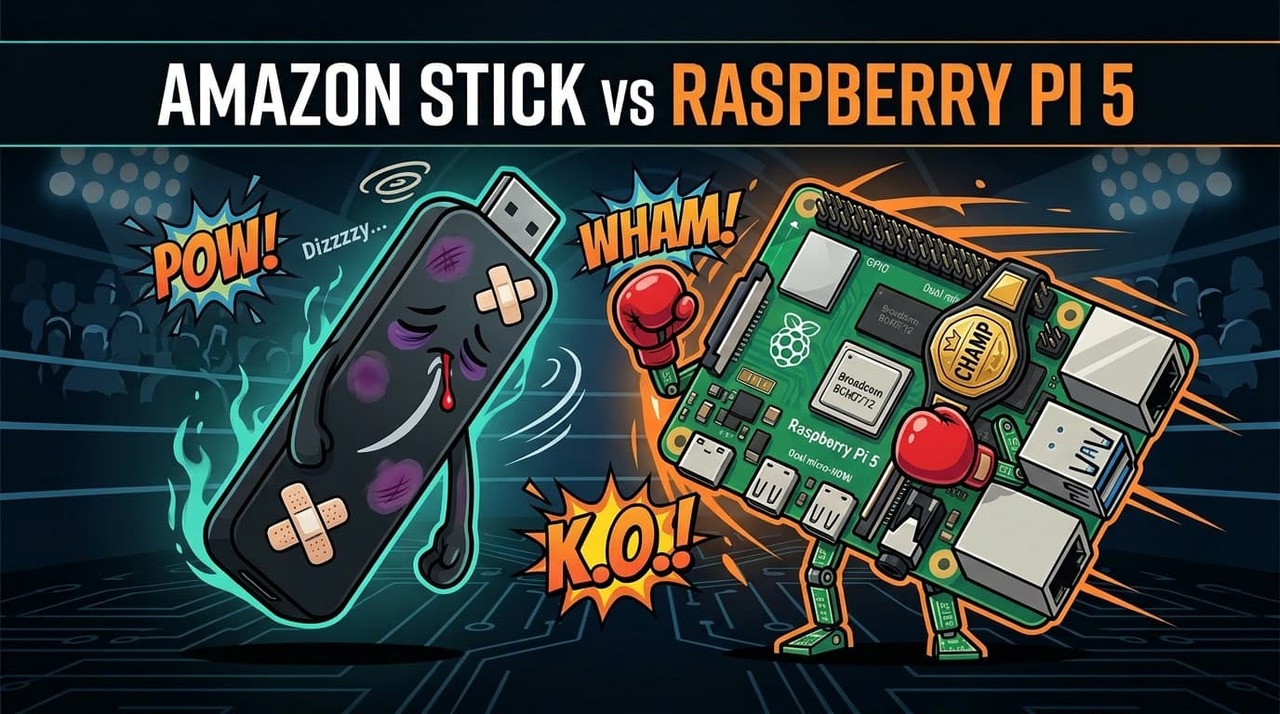
Finally, the comparison between Amazon’s Signage Stick and Raspberry Pi underscores a key architectural decision facing operators today—appliance-style simplicity versus open, extensible edge computing. The right choice depends less on price and more on deployment intent: whether the goal is turnkey signage at scale or a flexible, integration-ready platform for interactive, sensor-driven self-service.
Addendum for the stack and how it relates to Intel.
Sitekiosk Release - Key new capabilities
-
Identity & security
-
Keycloak is now supported as an identity provider for both cloud and on‑prem deployments, extending SSO and user management integration options (setup requires consultation).
-
-
Accessibility & input hardware
-
Adds support for the ANKER EAA‑Pad as an accessibility device, broadening supported accessible usage scenarios on kiosks. See EAA Checklist for Accessible Kiosk Design
-
-
Power and device management
-
Supports Nexmosphere NEO for power management, enabling more advanced use cases where display power supply and device control are relevant (e.g., turning peripherals on/off).
-
Platform and editor updates
-
Editor fixes
-
Fixes issues in the project editor when handling .webp and .gif images, improving reliability for asset-heavy layouts.
-
-
Runtime stack refresh
-
Updates the client platform to Electron 40.5.0 with Chromium 144.0.7559.177, giving a more current browser engine for stability, security, and compatibility in continuous operation. [144 is a January 2026 stable and extended‑stable branch (now also LTC/LTS in some ChromeOS channels).
-
-
General stability
-
Includes additional unspecified bug fixes and optimizations across the platform.
-
Practical implications
-
Better fit into enterprise IAM stacks (via Keycloak) in both cloud and on‑prem kiosk/signage environments.
-
Stronger accessibility story at the hardware level (EAA‑Pad) on top of the earlier accessibility features introduced in 1.7–1.8.
-
Improved options for interactive retail or DOOH scenarios where power control and sensor-driven experiences via Nexmosphere gear matter.
-
Reduced risk from an aging embedded Chromium and fewer editor hiccups with modern image formats.
Definitions
-
Keycloak is an open‑source identity and access management (IAM) platform used to handle authentication, single sign‑on, and authorization for applications and APIs.
Core idea
-
Runs as a central identity provider (IdP) that apps trust for login, logout, and token issuance instead of each app managing its own accounts.
What it provides
-
Single sign‑on and single logout across multiple web, mobile, and backend apps using OpenID Connect and SAML.
-
User management, roles, and groups, including integration with LDAP/Active Directory or external IdPs (Google, Azure AD, etc.).
-
Identity brokering and federation so you can plug multiple identity sources into one consistent login experience.
In kiosk/digital signage terms, it’s the central SSO service your players, CMS, and admin portals can delegate login to, instead of each system rolling its own auth.
SiteKiosk Online goes Raspberry Pi
January 29, 2026
SiteKiosk Online expands to Raspberry Pi, delivering a full-featured kiosk client. Sign up for the early beta starting at Integrated Systems Europe 2026.
SiteKiosk Online’s family of supported OS for the kiosk client will grow! By the end of this year, we will have a new client to bring SiteKiosk’s platform to the Raspberry Pi. This will be not only a simple Digital Signage client but a full featured Kiosk client. All key SiteKiosk Online features are supported, so you get the complete protect, manage, and show experience.
Starting with this year’s ISE in Barcelona, you can sign up to become part of our early beta program. Just send an email to sales-america@sitekiosk.com.
Reference https://www.sitekiosk.com/news/sitekiosk-online-goes-raspberry-pi/
How Does Amazon Stick Compare to Raspberry Pi
The Amazon Signage Stick is a purpose‑built, managed 4K signage “appliance” with tight cloud integration and kiosk features, while a Raspberry Pi 5 is a far more powerful and flexible general‑purpose controller that requires more integration work but can do much more beyond simple playlist playback.
Hardware and performance
-
Amazon Signage Stick: Quad‑core 2.0 GHz‑class SoC, 4K playback, integrated GPU around 850 MHz, 16 GB eMMC, Wi‑Fi 6E only (no Ethernet on the stick itself).
-
Raspberry Pi 5: Broadcom BCM2712, quad‑core Cortex‑A76 at 2.4 GHz, 2–3× the CPU performance of Raspberry Pi 4, up to 16 GB RAM, dual 4K HDMI, PCIe for NVMe, USB 3, and typically wired Ethernet available via the board or add‑ons.
For raw CPU, RAM capacity, I/O bandwidth, and multi‑display, the Pi 5 is significantly stronger, especially if you push anything beyond basic 4K video loops or need dual displays and local integrations.
OS, software stack, and manageability
-
Amazon Signage Stick: Runs a locked‑down Amazon‑managed OS with native kiosk mode, secure boot, automatic updates, data encryption, and is pre‑integrated with several CMS platforms for “plug‑and‑play” deployment.
-
Raspberry Pi 5: Runs Raspberry Pi OS or other Linux/Android variants; you pick the CMS (piSignage, Screenly, NowSignage, PosterBooking, etc.), and you’re responsible for imaging, locking down, and maintaining the OS and player.
If you want turnkey remote management with minimal engineering, the stick wins; if you want control over the OS, packages, and custom services, the Pi is better.
Connectivity, I/O, and integrations
-
Amazon Signage Stick: HDMI output plus Wi‑Fi 6E, powered via USB; no GPIO, serial, or native sensor/relay interfaces; external hubs/adapters needed even for simple wired Ethernet.
-
Raspberry Pi 5: Dual HDMI, USB 3/2, GPIO header, I2C/SPI/UART, camera, and plenty of HAT ecosystem support for industrial I/O, environmental sensors, serial devices, and relays.
For interactive kiosks, environmental triggers, or speciality peripherals, Pi 5 is clearly more appropriate.
Reliability, use cases, and TCO
-
Amazon Signage Stick: Designed and marketed specifically for 24/7 SMB signage with kiosk mode, watchdog behavior, “no‑input” resuming, and a more controlled update cadence than consumer Fire TV sticks.
-
Raspberry Pi 5: Widely deployed for 24/7 digital signage with the right CMS; supports watchdog daemons, health checks, and enterprise CMS features like proof‑of‑play, multi‑tenant control, and advanced data integrations.
Capex for a single screen is often lower or similar for each once you factor in Pi 5 board, case, PSU, storage, and mount, but the engineering and support cost on Pi will be higher unless you already have that tooling in‑house.
Quick fit summary
Need / Constraint Amazon Signage Stick Raspberry Pi 5 controller For our world (mixed kiosks, signage, and integrations), the most important factor is whether we need GPIO/serial and dual displays versus purely basic 4K signage; are our current projects mainly “dumb” screens or do you expect to hang peripherals and sensors off the controller?
Raspberry Pi Smart Display Module: coming soon
For those attending Integrated Systems Europe (ISE) 2026 in Barcelona, a visit to the Sharp booth might reveal something new, exciting, and not yet released…
We’ve been working with Sharp Display Solutions Europe to develop the Raspberry Pi Smart Display Module: an adapter board for Raspberry Pi Compute Module 5 that is designed to deliver high-quality, low-power display experiences for professional signage applications.
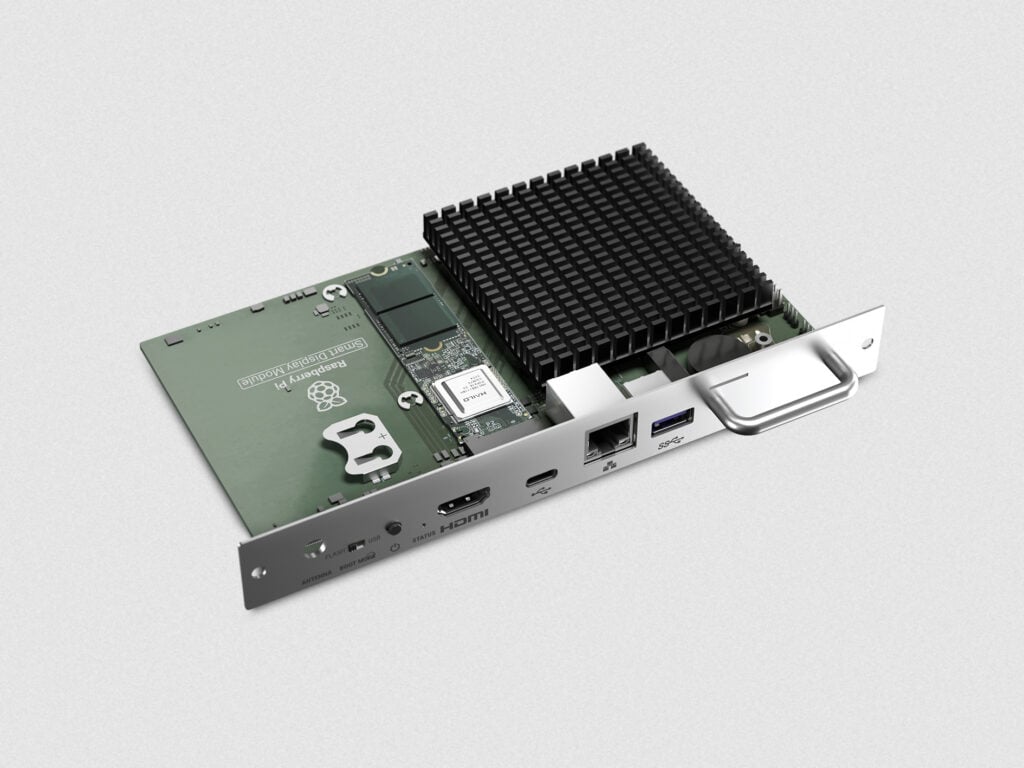
The Raspberry Pi Smart Display Module enables users in the audio-visual and digital signage markets to integrate the power, flexibility, and energy efficiency of Compute Module 5 into compatible display screens, with no external media player, cabling, or power source required. The module also provides HDMI output to support a second independent video stream, along with an M.2 expansion slot for optional AI acceleration.
Conforming to the Intel® SDM specification, the Raspberry Pi Smart Display Module slots directly into displays that support Intel’s standard, drawing power from the display itself. With the computer embedded inside the screen, installations are clean, reliable, and easy to maintain, making the Smart Display Module ideal for applications such as flight information systems, retail and corporate signage, and industrial displays.
We designed the Raspberry Pi Smart Display Module to be as straightforward to assemble as possible — customers can install it themselves without any specialist tools.
Enabling edge AI for digital signage
As organisations increasingly explore AI-powered digital signage, the Raspberry Pi Smart Display Module offers an efficient and practical solution. Able to integrate easily with compatible AI accelerators, the module enables edge AI processing to take place directly inside the screen it is paired with. This allows users to run analytics and AI-driven applications locally, privately, and in real time, without reliance on cloud-based services.
Raspberry Pi technology is already used by thousands of businesses and powers hundreds of thousands of screens worldwide; the introduction of the Raspberry Pi Smart Display Module further expands that ecosystem. By embedding AI capability directly into their display solutions, businesses can innovate rapidly and adapt to changing requirements with an energy-efficient, easy-to-integrate modular solution.
See it for yourself
ISE 2026 is taking place from 3–6 February 2026 at Fira de Barcelona, Gran Via. Visitors to the Sharp booth will be able to see the Raspberry Pi Smart Display Module in action ahead of its launch later this year.
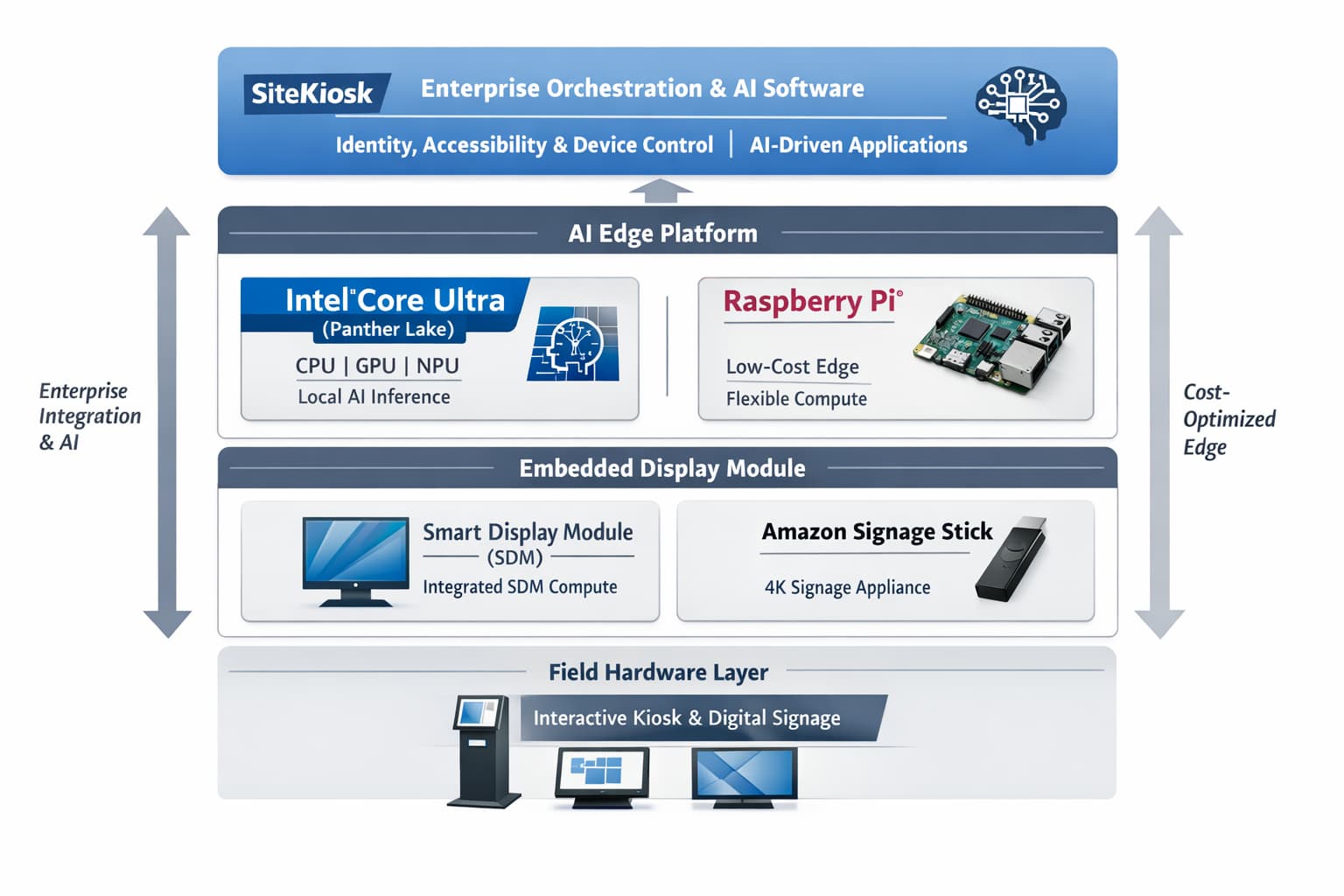
Big Picture — Intel Is Forcing the Architecture Shift
Intel Panther Lake isn’t just another CPU cycle — it’s a full edge AI platform:
- Integrated CPU + GPU + NPU (Gen-5)
- ~50 TOPS NPU + up to ~120 TOPS GPU = ~170–180 TOPS total AI
- Designed explicitly for local inference (LLMs, vision, voice)
This is the first time mainstream compute is natively capable of doing what kiosks/signage have been outsourcing to the cloud.
A) SiteKiosk Release (Software Stack)
We mention:
- Keycloak (IAM)
- Accessibility hardware
- Device control
- Chromium refresh
Intel alignment:
- Panther Lake is built for secure, local AI + enterprise manageability
- vPro + hardware security + local inference = no-cloud-required auth + processing
Takeaway:
SiteKiosk is evolving into the software layer that can actually utilize Intel’s AI edge stack
B) Raspberry Pi Expansion (Low-Cost Edge)
We note:
- Pi client support
- Flexible deployment
Intel alignment:
- Pi = cost-optimized edge
- Intel Ultra = performance + enterprise edge
👉 This is now a two-tier architecture:
Tier Role Raspberry Pi Low-cost signage / light kiosk Intel Ultra AI-enabled, sensor-rich, enterprise kiosk 👉 Key insight:
The Pi expansion doesn’t compete with Intel — it widens the funnel.
C) Smart Display Module (Embedded Compute)
Our note:
- SDM-based module
- Embedded compute in display
- Optional AI acceleration
Intel alignment (this is big):
- SDM is literally an Intel-defined standard
- Panther Lake + SDM = native drop-in AI compute inside displays
👉 This is where things converge:
Intel’s roadmap + SDM + embedded compute = “screen becomes the computer”
And now:
- No external media player
- No cloud dependency
- AI runs inside the display
D) Amazon Stick vs Raspberry Pi (Appliance vs Platform)
Our comparison:
- Amazon = closed appliance
- Pi = open platform
Intel reframes this entirely:
There are now three tiers:
Model Architecture Amazon Stick Cloud-dependent appliance Raspberry Pi Open edge compute Intel Ultra AI-native edge platform 👉 Key difference:
- Amazon = playback
- Pi = control
- Intel = inference + control + integration
3) The Real Strategic Shift
We are moving from:
- Content playback (signage)
- → Interactive systems (kiosks)
- → AI-driven edge inference systems
Intel is enabling:
- Vision (camera analytics)
- Voice AI
- Personalization
- Fraud/security detection
- Real-time decisioning
All locally. No cloud.
4) What This Means
1. Cloud dependency becomes optional
- Latency ↓
- Cost ↓
- Privacy ↑
2. Hardware decisions now define capability
- This is no longer just “which player?”
- It’s “what inference capability do you need?”
3. Lifecycle planning becomes critical
If you deploy cheap hardware today, you lock yourself out of AI capabilities for 5–7 years
5) Summary Line
Intel’s Core Ultra “Panther Lake” effectively turns every kiosk, display, and endpoint into a local AI node—aligning perfectly with the industry shift toward embedded compute, modular hardware (SDM), and software platforms like SiteKiosk that can orchestrate identity, accessibility, and device control at scale.
-
The Industry Group (aka Kiosk Association) comprises various related technology sites and news feeds from kiosks to digital signage to POS and Smart City. Retail Automation and EV Charging are others. Self-service technology (SST) is a type of technology that allows customers to perform various tasks without the assistance of a human. SSTs can bring many benefits to both customers and businesses, including cost savings, improved efficiency, and better customer experience.
The Kiosk Association comprises companies involved in self-service, digital signage, digital menus, outdoor technology, kiosks, point-of-sale, smart city, healthcare, telehealth, voice order, thin client, EV charging and retail automation.
- Pyramid Computer – Kiosks
- Olea Kiosks – Kiosks
- TPGi Screen Reader
- Intel Kiosk
- Nanonation Software
- KIOSK Information Systems
- 22Miles Digital Signage
- Acquire Digital Software
- LG Kiosks Digital Signage
- Sitekiosk Software
- REDYREF Kiosks
- imageHOLDERS Kiosks
- Ingenico Payment
- ACRELEC – kiosks
- NZ Technologies Inc.
- meldCX
- Crane CPI
- KT Group
- Goldfinger Monitors – Digital Signage
- Giada Digital Signage
- Urway Holdings
- Innovative Technology – Cash Experts
- Full List

Please sign in or register for FREE
If you are a registered user on AVIXA Xchange, please sign in